KMP uses Microsoft's SQLSRV driver, which installs as a PHP extension, to connect to a MSSQL database. This guide explains how to install this driver on Windows 2003 and Windows XP with IIS6.
Supported PHP versions:
- PHP v5.2.13+
- PHP v5.3.6+
Please note that PHP v5.4 and higher is NOT supported by SQLSRV v2.0. At the same moment SQLSRV v3.0 doesn't work on IIS6. So, if you're using IIS6 and MSSQL, you need to use v5.2.* or v5.3.* family of PHP with SQLSRV v2.0.
PHP must run via FastCGI (learn how to install PHP via FastCGI on IIS6).
Installation
Download the SQLSRV20.EXE file from the official Microsoft website. Please note that the other file, SQLSRV30.EXE, includes the drivers that do not support IIS6 - you do not need to download it.
Double click on the downloaded file. It is a self-extracting archive. It will ask you where to extract the files. Use a temporary target folder for this, you would need only one of the extracted files.
Check the upacked files. You can see a bunch of them, though you need only one file. We recommend to use PHP 5.3.6+ compiled with VC9 x86 Non Thread Safe, so if you installed PHP using one of our guides (guide for IIS6) the file that you need is this one:
Otherwise, pick a file that matches your version of PHP using this table.
Driver file
|
PHP version family
|
Thread safe?
|
Use with PHP .dll
|
|---|---|---|---|
php_sqlsrv_53_nts_vc6.dll
|
5.3.*
|
no
|
php5.dll
|
php_sqlsrv_53_nts_vc9.dll
|
5.3.*
|
no
|
php5.dll
|
php_sqlsrv_53_ts_vc6.dll
|
5.3.*
|
yes
|
php5ts.dll
|
php_sqlsrv_53_ts_vc9.dll
|
5.3.*
|
yes
|
php5ts.dll
|
php_sqlsrv_52_nts_vc6.dll
|
5.2.*
|
no
|
php5.dll
|
php_sqlsrv_52_ts_vc6.dll
|
5.2.*
|
yes
|
php5ts.dll
|
Copy the chosen file to the PHP extensions directory. By default it is C:\PHP\ext. If you're not sure, check the "extension_dir" parameter in the php.ini file.
To load the sqlsrv dirver, add the following line to the php.ini (if you're using other version of driver, adjust the setting accordingly):
Also, you would need to install Microsoft Visual C++ 2010 SP1 Redistributable Package (x86) on the web server.
Restart the web server.
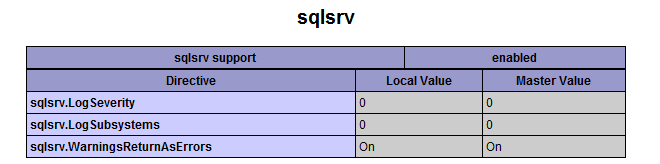
To determine whether the driver has been successfully loaded, run a script that calls phpinfo().
Search for "sqlsrv" on that page (use Ctrl-F shortcut in your browser). If sqlsrv driver is installed correctly, you should see something like this:
Microsoft SQL Server 2008 R2 Native Client must also be installed on the server on which PHP is running. To download and install SQL Server 2008 R2 Native Client now, click on the link below that matches the Windows edition on the web server:
